1、点击“InfixPDFEditor”

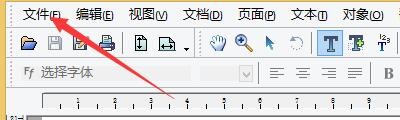
2、在“InfixPDFEditor”窗口中,点击“文件”
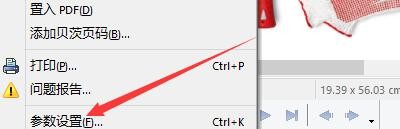
3、在弹出下拉栏中,点击“参数设置”
4、在“参数设置”窗口中,点击“编辑”

5、在“编辑”窗口中,勾选“编辑时智能插入引号”

6、点击“确定”即可

1、点击“InfixPDFEditor”
2、在“InfixPDFEditor”窗口中,点击“文件”
3、在弹出下拉栏中,点击“参数设置”
4、在“参数设置”窗口中,点击“编辑”
5、在“编辑”窗口中,勾选“编辑时智能插入引号”
6、点击“确定”即可